
PrePass
PrePass Safety AllianceAuto & Vehicles
3.435.00 Reviews
- Version
- 3.43.0
- Installs
- 10.00K
- Age Rating
- Everyone
Screenshots
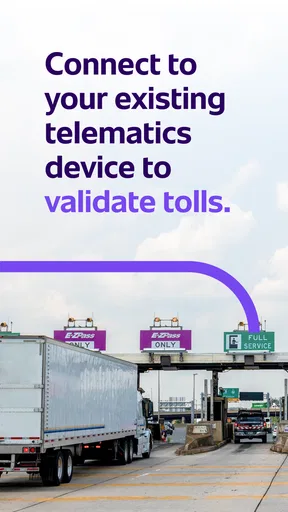
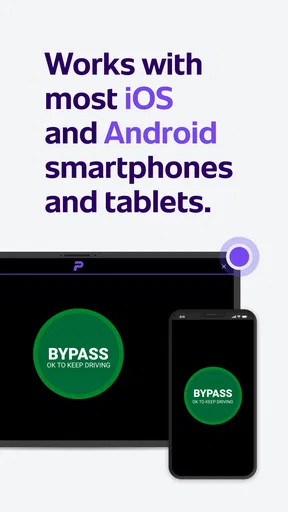

Our Review of PrePass
 Analysis by Appyee
For a professional driver, a weigh station is more than a brief stop on the road. It can interrupt a carefully planned route, change arrival times, and create uncertainty when several facilities are ahead. PrePass approaches that problem from the driver’s side by bringing weigh station bypass information and related alerts into a mobile app. I found its value is less about replacing every part of a trucking workflow and more about giving the person behind the wheel a clearer decision point before reaching a station.
That makes it a focused auto and vehicle app, rather than a general navigation tool. It is offered by PrePass Safety Alliance, costs nothing to download, and is rated for Everyone. The app has a 3.4 average from around seventy ratings, with roughly thirty-five written reviews, so the public response is mixed rather than overwhelmingly positive. That feels important to keep in mind: this is useful equipment for the right driver, but it is not something I would treat as a universal solution for every trip.
From route planning to the moment of decision
When I think about PrePass in daily use, the key question is not whether it can replace a driver’s other tools, but whether its alerts fit smoothly into the moments when a route demands attention. I would judge its speed by how promptly it becomes useful after opening and how little interaction it asks of me while driving. That leads naturally to the heavier-use situations, where preparation and restraint matter more than tapping through screens.
Starting with the right expectation
The first thing I would tell a friend is to understand what PrePass is trying to do before relying on it. Its central purpose is to provide weigh station bypass and alerts. In practical terms, that means helping a driver stay aware of relevant facilities and possible bypass information while moving along a commercial route. It is not a replacement for a truck-specific navigation system, dispatch instructions, roadside judgment, or the driver’s responsibility to follow posted directions.
That distinction changes how I would use it. I would open the app as part of trip preparation, not wait until I was already approaching a weigh station and expect the phone to solve everything instantly. A driver can first look at the planned journey, identify where weigh-related decisions may arise, and then keep the app available during the drive. This simple preparation step reduces the chance of treating an alert as a complete instruction when it is really one piece of the driving picture.
The app is especially relevant to drivers who regularly operate on routes with weigh stations and want a dedicated source of bypass-related awareness. It may also suit an owner-operator who prefers to check conditions personally instead of depending entirely on a dispatcher. On the other hand, a private motorist, occasional rental-truck user, or driver who never encounters commercial inspection points will probably gain very little from installing it.
Building the route before moving
My preferred workflow would begin while the vehicle is parked. I would review the route in the navigation app or dispatch system I already use, then consult PrePass for the weigh-station context. Keeping those jobs separate is a strength rather than a weakness. General navigation is normally better at turn-by-turn routing, road geometry, traffic planning, and arrival estimates, while a specialized app can concentrate on the inspection-related part of the journey.
This two-app approach does create a handoff. Before leaving, I would compare the route shown by the navigation tool with the facilities and alerts presented in PrePass. If the planned route changes later, I would repeat that check at the next safe opportunity. The non-obvious benefit is that the driver can catch a mismatch before it becomes a last-second lane decision. The trade-off is that the driver must actively reconcile two sources instead of expecting one screen to contain the whole trip.
I would also make a habit of checking the phone’s position and mounting arrangement before departure. An alert is only helpful if it can be noticed without distracting from driving. I would not handle the device while moving, and I would avoid making route adjustments in traffic. PrePass can support awareness, but it cannot remove the need for safe device use or attention to signs and instructions at the roadside.
Reading an alert as part of a larger picture
During the drive, the useful outcome is not simply seeing a notification. The driver needs to connect that notification with the current road, vehicle, and operating situation. If PrePass identifies an upcoming weigh-station event, I would verify that it matches the route I am actually following and then watch for the physical signs. A phone alert should prepare me to make a decision; it should not encourage me to ignore the facility itself.
This is where the app’s specialized focus can be valuable. A standard map may show a facility as a place on the road, but a dedicated weigh-station tool frames it as something that may affect the trip’s progress. That difference matters to a commercial driver working against a delivery schedule. The alert has practical meaning because it arrives in the context of a driving task, not merely as another point of interest.
At the same time, I would avoid assuming that every alert guarantees a bypass outcome. The safe habit is to treat the information as an indication to pay attention and follow the applicable direction. If the road signs, facility instructions, or operating circumstances tell me to enter, I would follow those instructions. This is one of the most important limitations of the workflow: the app can inform the decision, but it does not transfer responsibility away from the driver.
The handoff between driver, app, and roadside facility
The most interesting part of PrePass is the handoff it creates. The app gives the driver information, the driver compares it with the physical road, and the facility’s signs and procedures determine what happens next. That chain is easy to overlook when reading a short store description, but it defines the real experience. The app is not the final authority in the process; it is the digital link between trip planning and the roadside decision.
For a fleet, there can be another human handoff. A driver may receive a route from dispatch, use the app to monitor weigh-station events, and then report delays or changes through the company’s normal communication channel. PrePass does not eliminate those conversations. Instead, it can give the driver a more concrete reason to update dispatch, such as an upcoming station or a change in the expected flow of the trip.
For an owner-operator, that same process is more personal. I would be the planner, driver, and person deciding whether a delay needs to be communicated to a customer. The app’s value then comes from reducing uncertainty at one specific point in the route. It does not manage the whole business, but it can make one recurring road task easier to anticipate.
A realistic morning on the road
Imagine starting a long delivery run before sunrise. The route is already loaded into a separate navigation tool, and the vehicle is ready to leave. Before pulling out, I would open PrePass and review the route-related weigh-station information. If an alert is relevant to the journey, I would note where it sits in the sequence of stops rather than trying to memorize every detail while driving.
Later, traffic diverts the vehicle onto a different highway. This is the kind of ordinary event that tests whether an app is genuinely useful. I would not assume that the earlier review still covers the new path. Once parked safely, I would check the revised route again and use PrePass to reassess the weigh-station situation. That extra check is a practical tip: route changes should trigger a fresh review, because information tied to the original plan may no longer be the information I need.
As the vehicle approaches a facility, the alert provides advance awareness. I would slow down only as required by the road, observe the signs, and follow the instructions presented at the station. If the outcome is a bypass, the app has helped me prepare for that transition. If the vehicle must enter, the app has still served a purpose by reducing surprise and giving me time to organize the approach safely.
Afterward, I would continue using my normal navigation and dispatch workflow. The result is not a dramatic change to every mile of the trip. It is a more orderly handoff at a point where uncertainty can otherwise cause rushed decisions. That is the realistic benefit I see: better preparation and awareness, not a promise that every station disappears from the route.
What the result looks like for different drivers
For a frequent commercial driver, the result can be cumulative. Even a small improvement in knowing when a weigh-station decision is approaching may make a route feel less reactive. The app is most convincing when used as a routine check before departure and after major route changes. In that role, it complements existing tools instead of competing with them.
For a fleet manager, the result is more limited from the app alone. PrePass may help individual drivers stay aware, but a company still needs its own procedures for routing, compliance, communication, and incident handling. I would not introduce it as a substitute for training or dispatch coordination. I would present it as one driver-facing layer in a larger operating process.
For someone who drives only occasionally, the setup may not justify itself. A general navigation app and careful attention to road signs may be enough for a non-commercial trip. The specialized nature that makes PrePass useful to truck drivers also makes it unnecessary for people who do not regularly encounter weigh-station decisions.
Where the workflow breaks down
The biggest weakness is dependence on context. An alert is only useful when it relates to the route, appears at a workable time, and can be interpreted alongside the physical road. If any part of that chain becomes unclear, the driver still has to rely on signs, judgment, and established procedures. That means I would never use the app as permission to stop checking the roadside environment.
There is also friction in maintaining two separate tools. If I use a navigation app for routing and PrePass for weigh-station awareness, I must remember which app answers which question. Switching attention between them can be inconvenient, especially when a route changes unexpectedly. My solution would be to do as much comparison as possible while parked and keep the driving-time interaction minimal.
Another limitation is that the app’s public rating is only moderate. With more than ten thousand installs and a current version of 3.43.0, it has a real user base, but the rating suggests that the experience may not be equally smooth for everyone. I would test it on familiar routes before depending on it during a critical delivery. That trial period is a sensible safeguard for any road-safety-related utility.
Compatibility is also worth checking before installation. The app requires Android 9 or later, so an older Android phone may not be suitable. A driver using a supported device should still evaluate how comfortably the app fits into the vehicle’s existing setup. A technically compatible phone is not automatically a convenient or safe in-cab arrangement.
How it compares with the usual alternatives
The usual alternative is to depend on a general navigation app and roadside signs. That approach is simpler because it keeps routing in one familiar place, and it may be perfectly adequate for drivers who only occasionally pass a weigh station. Its weakness is that weigh-station awareness is not the main purpose of a general map, so the information may feel less central to the trip.
A dispatcher-led workflow is another alternative. In a well-organized fleet, dispatch may already provide route guidance and instructions, reducing the need for a driver to manage another app. PrePass can still add a driver-level view, but it may offer less value where company procedures already handle every relevant decision clearly.
Dedicated commercial navigation equipment can be better for a driver who wants routing, vehicle restrictions, and trip planning in one system. I would choose that kind of solution when the main problem is complete truck navigation rather than weigh-station awareness. PrePass makes more sense when the driver already has a trusted route planner and wants a focused companion for bypass information and alerts.
Small habits that make it more useful
I would use three habits with this app. First, review it before departure while the vehicle is stationary, not as a last-second reaction. Second, repeat the review after a meaningful detour or route change. Third, treat every alert as a prompt to verify the road and facility instructions, never as a reason to disregard them.
A fourth habit is to test the workflow on a familiar trip. That lets me learn how the alerts fit into my navigation routine without the pressure of an unfamiliar delivery. It also reveals whether the phone position, sound level, and screen visibility work for my vehicle. These are small operational details, but they determine whether a specialized driving app helps or simply adds another distraction.
I would also tell a new user to explain the app’s role to anyone sharing the driving workflow. If a co-driver, dispatcher, or fleet supervisor assumes that PrePass replaces the normal route system, confusion can appear at exactly the wrong moment. Clear handoffs matter: one person can monitor the route, another can review the alert, but the driver remains responsible for the immediate road decision.
My recommendation after using it
PrePass is a sensible free tool for the driver who repeatedly deals with weigh stations and wants dedicated alerts alongside an existing navigation setup. I like its narrow purpose because it addresses a real part of commercial driving without pretending to be an entire fleet-management platform. The strongest use case is a prepared workflow: check the route while parked, watch for relevant awareness during the trip, verify the physical signs, and continue with the normal dispatch or navigation process.
I would skip it if I were a casual driver, if my company already provides a complete and reliable equivalent, or if managing a second app would create more distraction than clarity. I would also avoid depending on it immediately for an important run without first learning how it behaves on routes I know. The middling 3.4 average is a reminder to approach it practically rather than assuming a flawless experience.
Overall, I see PrePass as a useful companion rather than a standalone driving solution. Its outcome is modest but meaningful: it can make weigh-station decisions easier to anticipate and hand off within a normal road workflow. If that is the specific problem you face, the free price makes trying it reasonable. If you need full truck navigation, dispatch management, or a substitute for roadside instructions, you should look elsewhere or keep those tools in place beside it.
Verdict
Strengths of PrePass
- Helps identify participating toll roads before starting a trip.
- Can display toll rates and account details in one place.
- Useful for frequent travelers who want faster electronic toll payments.
- Supports vehicle and transponder management from the mobile app.
- May reduce the need to stop and pay at toll booths manually.
Limitations of PrePass
- Coverage and benefits depend on participating toll agencies and locations.
- Account setup may require vehicle, payment, and personal information.
- Some features may be limited without an active PrePass account.
- Toll charges can be difficult to track when multiple vehicles are linked.
- App usefulness is limited in areas with few compatible toll roads.
Similar Picks in This Category
View All
Android Auto
Google LLC4.1

maxim — order a taxi & food
PT. SITO4.7

Штрафы ГИБДД: проверка с фото
Pays LLC – Штрафы ГИБДД4.7

Номерограм – проверка авто
Авто Ассист4.8

Дром Авто
Дром4.9

Frequently Asked Questions
What is PrePass, and how does it work?
PrePass is an electronic screening service designed to help eligible commercial motor carriers bypass participating weigh stations and inspection sites when they meet the required safety and credential standards. The system uses a transponder and carrier information to communicate with enforcement facilities. Drivers should follow the in-cab signal and posted instructions, because an electronic bypass indication is not guaranteed at every location or on every trip.
Is PrePass available for every truck, carrier, or weigh station?
No. PrePass availability depends on the carrier’s enrollment, vehicle setup, operating authority, and the locations participating in the PrePass network. Some states, inspection facilities, or routes may not support the service, and certain vehicles or credentials may require additional approval. Before relying on it, carriers should confirm coverage for their routes and ensure that all vehicle, driver, and account information is accurate and current.
What does the PrePass app allow drivers and fleet managers to do?
The PrePass app can provide account-related tools and information for enrolled users, such as reviewing service details, managing vehicles or transponders, checking account status, and accessing support resources. Available features may vary by user type, subscription, and region. It should be treated as a companion to the electronic transponder and official roadside instructions, rather than as a replacement for required equipment or compliance procedures.
Does using PrePass guarantee that a truck can bypass an inspection or toll facility?
No. PrePass does not guarantee a bypass. A vehicle may be directed to enter a weigh station or inspection site because of its safety record, credentials, vehicle classification, random selection, facility conditions, or other enforcement criteria. Drivers must always obey the displayed signal, transponder instruction, and roadside signage. Ignoring a required pull-in can result in violations, delays, or enforcement action.
Is PrePass free, and what should I check before downloading it?
PrePass services may involve enrollment requirements, subscriptions, equipment costs, or other charges depending on the products selected and the carrier’s arrangement. The app itself may be available at no separate download cost, but access to certain services can require an eligible account. Before installing it, verify device compatibility, review the current terms and privacy information, and confirm that the service supports your fleet and operating routes.
